Port Configurations
The Hub's four Ethernet ports and built-in wireless access point (WAP) can be configured in a variety of ways to meet your vessel's needs. Some of the most common configurations can be selected from the drop-down menu on the Port Configuration page of the web interface or KVH Manager. The default configuration is illustrated below.
All LAN Configuration (Default)
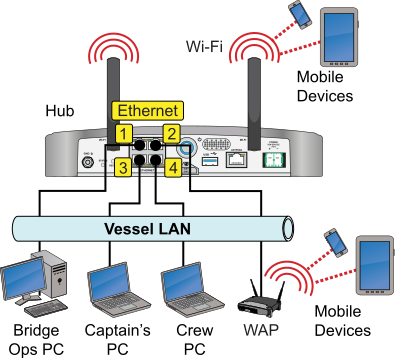
Configuration Options
| Option | Description |
| All LAN | Ports 1-4, Wi-Fi: LAN |
| User LAN, Plus backup and alternate WAN | Ports 1-2, Wi-Fi: LAN Port 3: Backup WAN egress Port 4: Alternate WAN egress |
| User LAN, Plus backup and Starlink WAN | Ports 1-2, Wi-Fi: LAN Port 3: Backup WAN egress Port 4: Starlink WAN egress |
Note: For details on adding backup and alternate WAN connections, see Backup WAN Option and Alternate WAN Option.
Deactivating Ports
If you do not want all four Ethernet ports on the Hub's rear panel to be active according to the chosen port configuration, you can deactivate one or more ports. Select under the Port Status table, set the desired port(s) to , then select . To deactivate the Hub's built-in LAN Wi-Fi, you need to go to the Network Settings page – see LAN Wi-Fi Settings.
DOES NOT APPLY TO THIS ANTENNA MODEL

Was this topic helpful? Please share your feedback.
© 2024-2025, KVH Industries, Inc., All rights reserved.